Live cameras
To use the HoloCapturerPipeline with live cameras, we must modify the cameraconfig.json file.
Requirements
- A data provider is required. Currently, there are 3 options:
- Kinect camera,
Open Azure Kinect SDK, andAzure Kinect Viewer. - Orbbec camera,
OrbbecSDK, andOrbbecViewer. HoloCalibrationis required for multi-cam usage. For single cam, it is recommended but not necessary.
- Kinect camera,
Integration
-
Open the Unity project in the explorer and open the file
cameraconfig.json. -
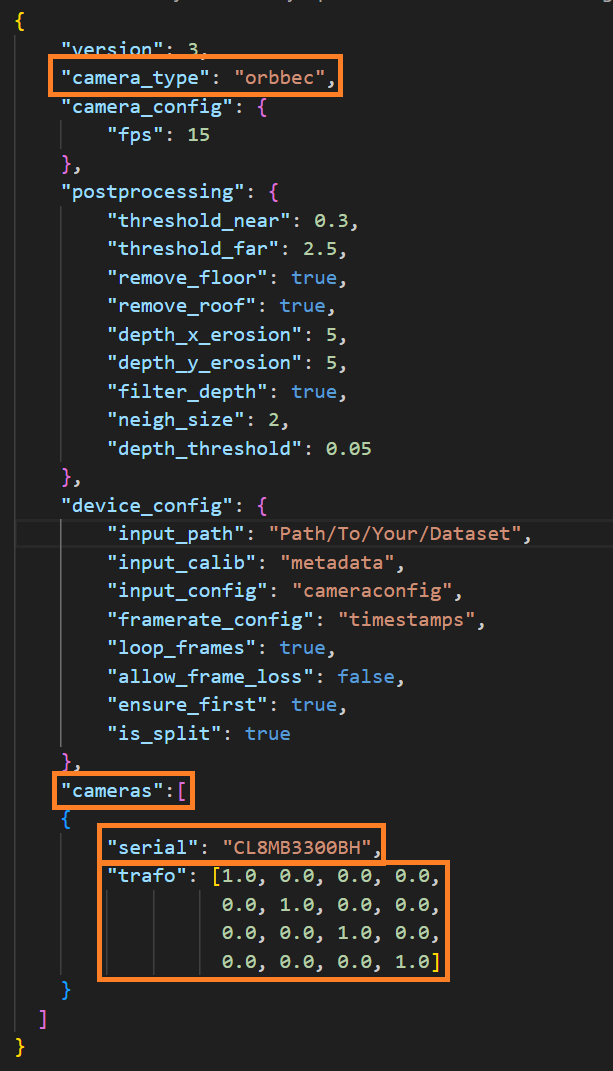
There are 2 main parameters to be aware of:
camera_type: the type of camera input you want to use.cameras: the section where the cameras in use are defined and their transformation matrices.
-
Change the
camera_typeto the type of camera you want to use. The ones available arekinectororbbec. -
Change the
camerassection according to the cameras you have in use. It includes:serial: the serial number of the camera in use.trafo: the transformation matrix of said camera. For single cam usage, the identity matrix will suffice. For multi-cam, please useHoloCalibration.
Configuration parameters
Consult cameraconfig.json documentation for all configuration parameters available.